
Open Custom Block With Params
Opens a block built from the low code builder by passing params
Description
The openCustomBlock action opens a specific custom block within the Superfans app.
Custom blocks are reusable, developer-defined UI components that extend app functionality — such as loyalty widgets, referral screens, or promotional experiences. This action allows you to programmatically launch those blocks from anywhere in your app.
Function SIgnature
Superfans.actions.openCustomBlock({
		type: "full_screen",
		id:  "cbk_5das675asd765asd",
		params:{ productId : "12345567" } //optional
 //optional
})
| Parameter | Type | Required | Description |
|---|---|---|---|
| type | String | yes | The type of the custom block created. values would be : full_screen, popup_center, popup_bottom |
| id | String | yes | The unique ID of the custom block created. |
| params | Object | no | This is optional parameter. You can pass any object like productID, CollectionID, etc., |
Retrieval of Block ID
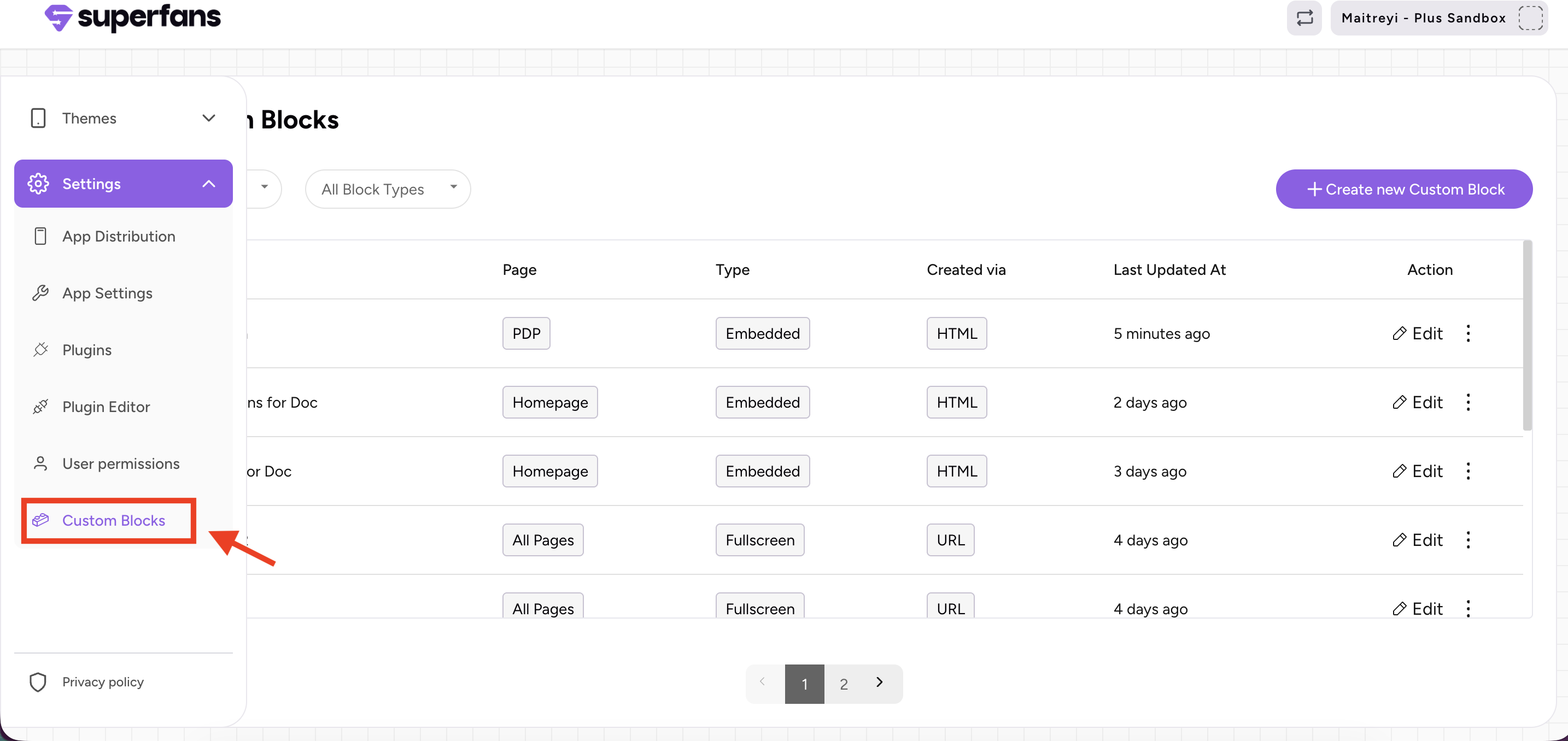
Step 1: Navigate to the Custom Block section in the Superfans dashboard and select the custom block you want to open through code.
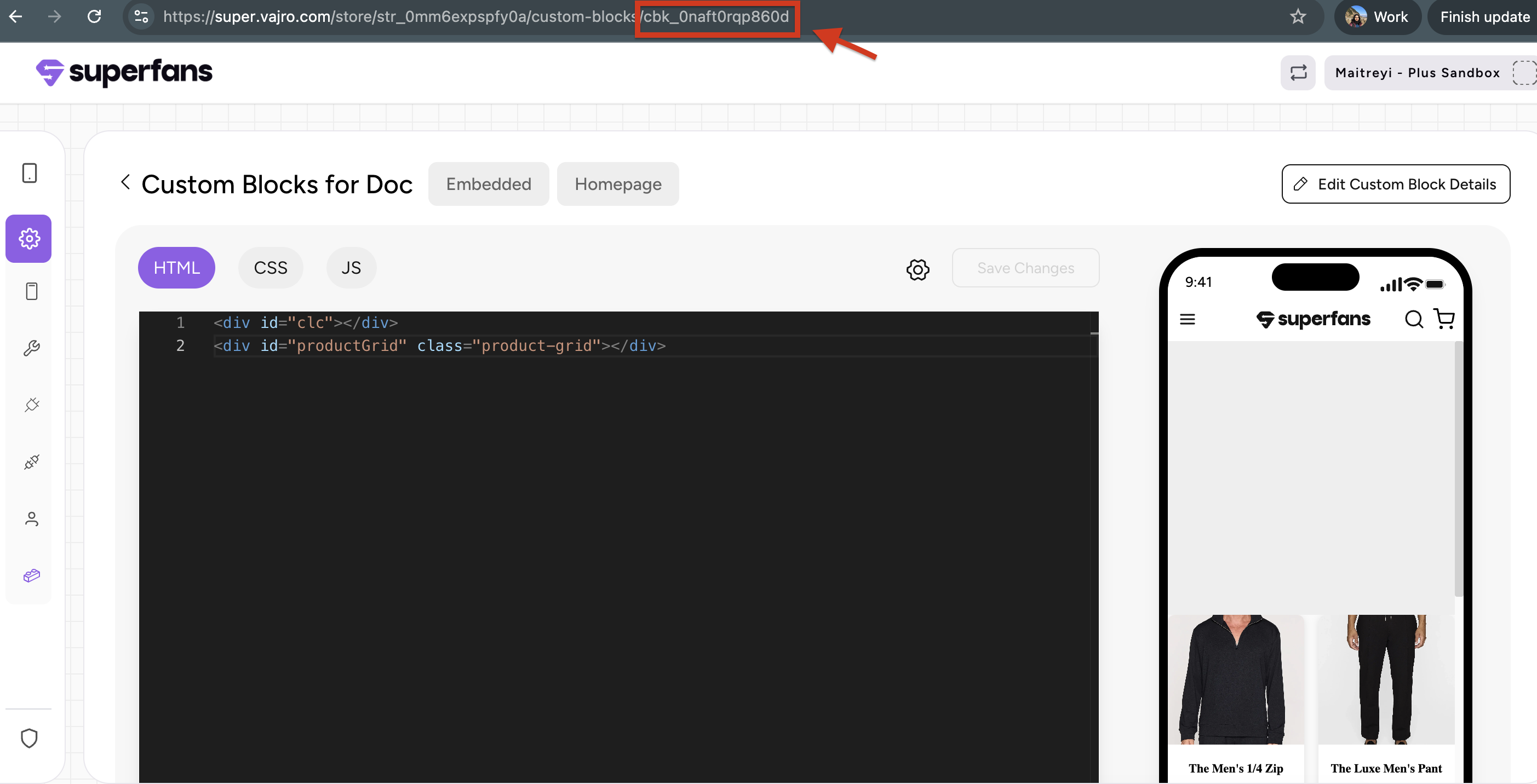
Step 2: Copy the ID of the custom block which is the at the end of the URL after "/".
Structure of Response
| Status | Response |
|---|---|
| Success | { "status": "success", "message": "Custom block opened successfully" } |
| Invalid Url | { "status": "error", "errorId": 400, "errorHandle": "invalid-url", "message": "Invalid url" } |
| Unexpected Error | { "status": "error", "errorId": 500, "errorHandle": "unknown-error", "message": "Something unexpected happened" } |
Example Usage where an embedded block opens full screen block by passing param
Code of embedded block which sends the param to open full screen block
function openVideo() {
    Superfans.actions.openCustomBlock({
        type: "full_screen",
        id: "cbk_0qjqcxt9h3601", // id of the full screen block that needs to be opened
        params: {
            video_source: "https://res.cloudinary.com/de1nc35om/video/upload/v1765359988/samples/cld-sample-video.mp4",
            video_poster: "https://res.cloudinary.com/de1nc35om/image/upload/v1765359995/samples/outdoor-woman.jpg"
        }
    })
}
Superfans.actions.resizeBlock();
<img src="https://res.cloudinary.com/de1nc35om/image/upload/v1765359985/samples/ecommerce/accessories-bag.jpg" height="50%" width="100%" onclick="openVideo()">
Code of Full Screen block which retrieves the param from embedded screen block
// Get video element
const video = document.getElementById("videoElement");

// Retrieves the value from params
const videoSrc = params.video_source;
const poster = params.video_poster;

// Dynamically assign source and poster
if (video && videoSrc) {
 video.src = videoSrc;
 if (poster) video.setAttribute("poster", poster);
}
/**
* ✅ Resize the block via Superfans
*/
async function resizeBlock() {
 try {
   await Superfans.actions.resizeBlock();
   console.log("📏 Resized block.");
 } catch (error) {
   console.error("❌ Resize failed:", error);
 }
}
/**
* ✅ Setup listeners for state changes
*/
if (video) {
 video.addEventListener("loadedmetadata", () => {
   resizeBlock();
   video.play().catch((e) => console.warn("⚠️ Autoplay failed:", e));
 });
 video.addEventListener("play", resizeBlock);
 video.addEventListener("pause", resizeBlock);
 video.addEventListener("ended", resizeBlock);
 // Optional: enable tap-to-play on iOS
 video.addEventListener("click", () => {
   video.muted = false;
   video.play().catch((e) => console.warn("⚠️ Play error:", e));
 });
}
<div class="video-container">
<video id="videoElement" autoplay="" muted="" playsinline="" webkit-playsinline="" controls="" controlslist="nodownload nofullscreen noremoteplayback"></video>
</div>.video-container {
position: relative;
width: 100%;
height: 100vh;
/* Full screen height */
background-color: black;
display: flex;
justify-content: center;
align-items: center;
overflow: hidden;
}
video {
width: auto;
height: 100%;
object-fit: cover;
/* Maintain aspect ratio while covering */
}Best Practices
- Pass relevant data via props: Use props to send dynamic content (like user status or campaign IDs).
- Combine with analytics: Track how often blocks are opened to measure feature engagement.
- Graceful fallbacks: Always include error handling (.catch()) for unpublished or missing blocks.
- Keep it lightweight: Avoid passing overly large data in props — use identifiers instead.
Caveats
- In-app context only: This action only works within the mobile app environment.
- No automatic data refresh: Blocks won’t auto-fetch new data unless coded to do so.
- Async execution: Always await or handle the Promise response to detect navigation completion.
Updated 5 months ago